
Portfolio growth outpaces the systems built to track it — until vendor onboarding becomes a system, not a memory.
The Vendor Nobody Remembered Approving
Three months into managing a newly expanded pan-European office portfolio, a fire-alarm testing contractor turned up at a Frankfurt site with no insurance certificate on file, no signed scope of work, and no record of who had approved site access. The building manager let them in anyway. The vendor had “worked on a building somewhere in the portfolio” for two years. Nobody could say which building, under what contract, or with what insurance limits.
The checklist behind that vendor had worked perfectly well when the portfolio was eight buildings under one FM manager who knew every contractor by name. At sixty buildings across three countries and six regional teams, the same checklist — still a spreadsheet living in one person’s inbox — had quietly stopped functioning. Nobody had redesigned it. It just stopped scaling, and nobody noticed until an auditor asked to see the file.
What made it worse was that the failure was invisible until it was tested. The spreadsheet still opened. It still had rows in it. It looked like a working system right up until someone needed a specific answer about a specific vendor at a specific site, at which point it became clear the checklist had never been designed to answer that question at scale — only to remind one person, at one desk, of what they already half-remembered.
Why It Happens
Vendor onboarding checklists are almost always built for the operation that exists on day one — a single site, a single manager, a small enough vendor list that informal knowledge fills the gaps. “Everyone knows this vendor” is a real control right up until the portfolio grows through acquisition, expansion, or a regional restructure, at which point it becomes the biggest gap in the file.
Once ownership splits across regional teams, the failure modes multiply fast: the same vendor gets onboarded twice under two different names, insurance certificates expire without anyone tracking the date, and approval authority becomes untraceable because five different people have signed off on contractors in five different formats. The root cause is rarely carelessness. It’s that the checklist was scoped to onboard one vendor, not to track every vendor across every site with a single audit trail.
Acquisitions make this worse in a specific way: the acquired portfolio arrives with its own vendor base, its own (often undocumented) approval habits, and its own definition of what “onboarded” even means. Without a single master format that every region adopts on day one of integration, the FM team inherits two incompatible systems instead of one scalable one — and the gap between them is exactly where compliance findings live.
What Good Looks Like
A checklist that scales with the portfolio, rather than breaking under it, shares five characteristics:
- A single master vendor record shared across every region — not a spreadsheet per site or per manager
- Standardised document requirements (insurance limits, licences, tax status) applied identically regardless of which regional team runs the onboarding
- Expiration tracking that flags a lapsing certificate before it lapses, not after an auditor finds it
- A consistent, traceable approval chain — regardless of who signs, the record shows who approved what and when
- A format that works the same at eight buildings or eight hundred, so growth doesn’t force a redesign
Real FM Example
I managed a pan-European commercial office portfolio through two acquisitions that took it from roughly fifteen buildings to more than sixty across the UK, Germany, and the Netherlands. The onboarding process before the acquisitions was solid — for fifteen buildings. It didn’t survive contact with sixty.
We standardised vendor onboarding into a single checklist format used identically regardless of region or local team, cross-referenced against a rolling insurance-expiry tracker rather than a static file review. The result showed up at the next quarterly compliance audit: vendor documentation gaps found per audit cycle dropped from an average of 14 missing or expired items to zero within two quarters — and stayed there, because the tracking was now proactive rather than reactive.
The bigger shift was cultural, not procedural: regional teams stopped treating vendor onboarding as local paperwork and started treating it as a shared record they were each contributing to. That’s the actual test of whether a checklist scales — not whether it works for the person who built it, but whether it works identically for the next five people who never saw it built.
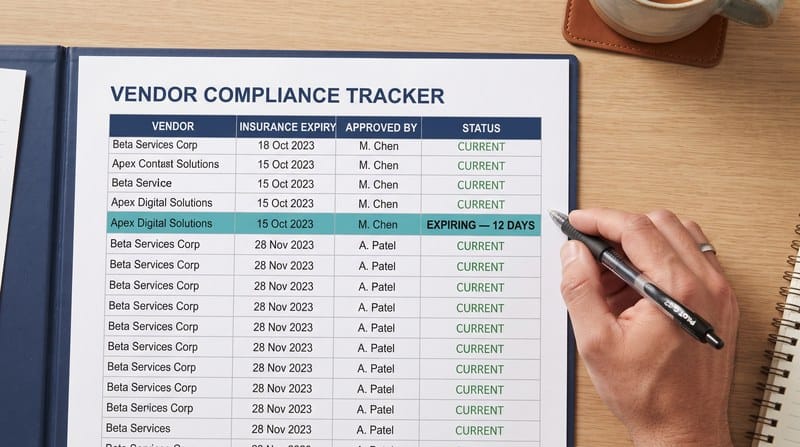
A flagged expiry, caught before it lapses — not after an auditor finds it.
| In 20+ years of FM operations across Asia-Pacific and Europe, I have seen vendor onboarding collapse the moment a portfolio outgrows a single manager’s memory. The fix isn’t a stricter checklist — it’s a checklist built as a system from day one, not a transaction. |
What It Covers
The Vendor Onboarding Checklist in the FM Operations Playbook Pack is built as a system, not a form. It includes:
- A structured vendor onboarding process with a required-documents checklist
- A performance evaluation framework (monthly, quarterly, and annual review cadence)
- Contract management procedures covering renewal and change tracking
- A safety and compliance verification section, including insurance expiry and licence/certification tracking
- Payment and invoice processing controls
- A vendor offboarding protocol — so exits are as controlled as onboarding
Get the Checklist
The Vendor Onboarding Checklist ships as part of the FM Operations Playbook Pack — Starter Tier ($29), alongside the Preventive Maintenance Calendar and Cost Variance Tracker, as ready-to-use Word and Excel templates plus an AI Prompts Reference guide.
→ Get the FM Operations Playbook Pack — Starter Tier at the BizzXpert Store